200+ Best Free Online Tools

In 2025, more people than ever rely on online tools to calculate, convert, fix, test, and solve everyday problems instantly. Whether it’s checking your salary tax, compressing an image, converting a PDF, analyzing text, running an AI test, or calculating loan EMIs, online tools save time and make life easier.

That’s exactly why iLuvTool was created – to bring more than 200+ free online tools into one simple, fast, ad-free platform anyone can use.

200+ Best Free Online Tools to use in 2026

Below is the full mega collection of the most popular and useful tools of 2025, all available at iLuvTool.com — free forever.

Financial Calculators (Malaysia, SEA & Global)

These tools help you plan finances, estimate taxes, and calculate your take-home salary with accurate real-time formulas.

AI-powered Tools:

All powered by smart AI models, giving fast and helpful insights.

PDF & File Tools:

Perfect for students, employees, freelancers, teachers, and creators.

Useful Everyday Tools:

Simple tools that solve quick daily tasks with zero ads and zero sign-up.

Why iLuvTool Is Growing Fast in SEA & Worldwide?

  1. 200+ tools in one place
  2. Completely free to use
  3. Zero signup, zero subscription
  4. No annoying ads
  5. Instant loading
  6. Works on any device (Android, iPhone, Windows, Mac)
  7. Tools updated daily
  8. SEO-optimized & accurate calculations

iLuvTool is one of the fastest-growing tool platforms in Malaysia, Singapore, Thailand, South Africa, and India.

Explore All Tools:

Visit: https://iluvtool.com

Whether you’re calculating income tax, checking your friendship level, or compressing a photo – iLuvTool gives you fast, simple tools that work instantly.

Fake invoices are becoming a major problem in 2025 – especially across e-commerce, B2B payments, freelancers, accounting teams, and social media scams.

Fraudsters now use:

  • Edited screenshots
  • Altered invoice amounts
  • Fake templates
  • AI-generated invoices
  • Modified PDFs and JPEGs
  • Recycled invoice numbers

This is why invoice authenticity checks are critical.

The AI Invoice Authenticity Detector from iLuvTool allows anyone to upload an invoice image and instantly scan for manipulation patterns.

Everything runs 100% locally on your device – no uploads, no storage.

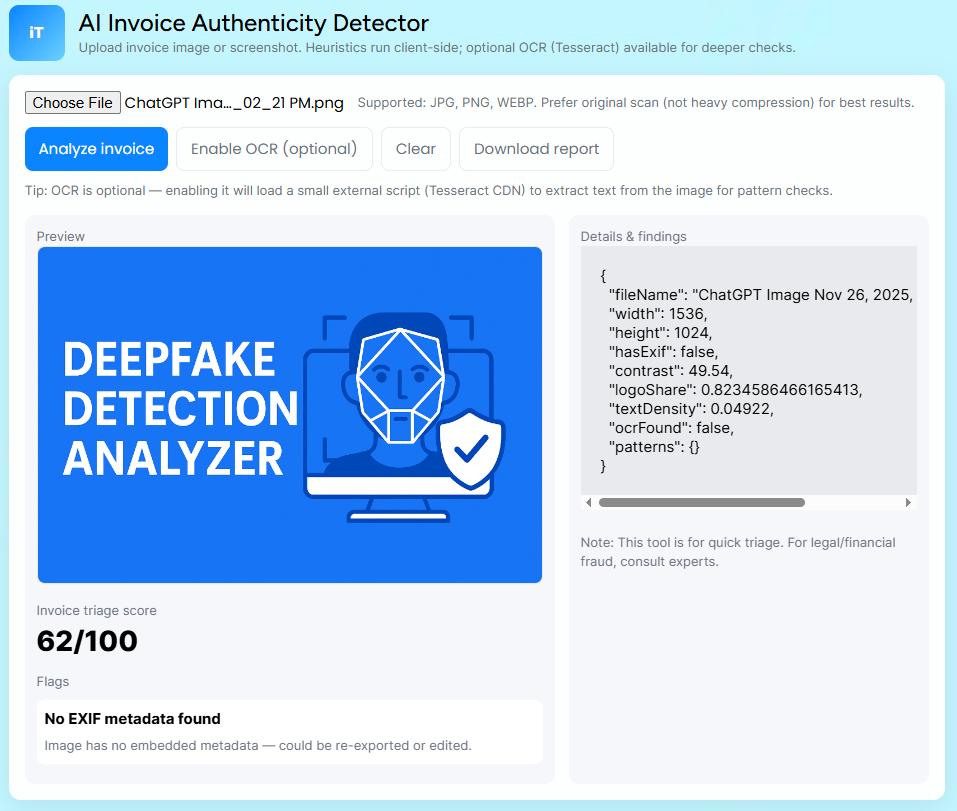
screenshort of AI Invoice Authenticity Detector

What This AI Invoice Detector Actually Does?

The tool uses a combination of heuristic-based checks:

✔ ELA (Error Level Analysis)

Detects regions with abnormal compression and editing.

✔ Noise Pattern Comparison

Edited text or numbers often have different noise.

✔ Metadata Inspection

Fake invoices usually have missing EXIF or suspicious metadata.

✔ OCR Text Extraction (Optional)

Extracts text via Tesseract to identify:

  • Inconsistent font sizes
  • Spacing anomalies
  • Misaligned amounts
  • Tampered fields

✔ Pixel-Level Hotspot Mapping

Highlights suspicious zones that differ from the rest of the image.

This is not forensic-level — but it gives fast, reliable triage for business and personal use.

Conversational Q&A:

“How can I check if an invoice is authentic?”

Upload the invoice to the AI Invoice Authenticity Detector. It scans for manipulated regions, metadata issues, inconsistent fonts, and edited amounts.

“Is this invoice edited?”

If the totals, bank details or text appear different in noise or compression, it may be edited.

“How do scammers fake invoices?”

They change bank accounts, modify amounts, or edit dates on screenshots.

“Is it safe to upload my invoice?”

Yes – the tool runs locally in your browser.

“Can AI detect invoice fraud?”

AI can highlight editing patterns and inconsistencies, making it easier to spot fake or modified documents.

How to Use the AI Invoice Detector (Step-by-Step)

Step 1 – Upload the invoice

Use original image if possible.

Step 2 – Tap “Analyze invoice”

The system scans:

  • Noise
  • EXIF
  • Compression
  • Regions
  • Edits
Step 3 – Enable OCR (Optional for deeper checks)

OCR helps detect:

  • Font mismatches
  • Altered numbers
  • Manual edits
Step 4 – Review Flags

RED = high risk
YELLOW = suspicious
GREEN = normal

Step 5 – Download the report

Useful for:

  • Business verification
  • E-commerce disputes
  • Internal audits
  • Document review

What Fake Invoices Look Like (Common Signs)?

People often modify invoices by:

  • Editing the total amount
  • Changing bank account numbers
  • Altering dates
  • Removing watermarks
  • Editing screenshots with apps
  • Replacing company logos
  • Merging different invoice parts

Your tool detects many of these patterns.

Industries That Benefit from Invoice Authenticity Tools:

  • E-commerce sellers
  • Dropshippers
  • Freelancers
  • Small businesses
  • Accounting teams
  • Procurement
  • Logistics
  • Manufacturing
  • Real estate
  • Students receiving scholarship invoices

Warning: Invoice Fraud in Malaysia:

Scams increasing in MY:

  • Fake Shopee/Lazada invoices
  • Edited PDF invoices
  • Modified bank accounts for payment diversion
  • Fake courier/delivery invoices
  • Fake repair invoices

FAQs:

Can scammers edit invoices easily?

Yes. Anyone can change totals or bank numbers using editing apps.

Does this detect PDF deepfake invoices?

The tool analyzes image-based invoices; convert PDFs to images first.

Is this safe for business use?

Yes – it’s private and device-side.

Can this tool verify tax invoices?

It can detect editing but can’t verify government tax registration.

Related Tool:

Disclaimer:
This tool provides heuristic checks only and may not detect all manipulation. For legal or identity matters, consult an official authority or expert.

Home » fake invoice detection

“Content reviewed and human-edited for accuracy.”