
If you ever needed to resize an image quickly – for WhatsApp, Instagram, websites, school work, or product photos – you know how annoying some tools are. Slow uploads, watermarks, ads everywhere… headache.
That’s why I built a free, fast, offline Image Resizer that works directly in your browser.
👉 Try it here: https://iluvtool.com/image-resizer/
(No upload. No signup. No spam.)
Why Resize Images?
Resizing helps when you need to:
- Make a photo smaller to upload faster
- Fit exact dimensions (800×800 for product photos)
- Reduce file size for websites
- Create thumbnails
- Fix big PNG or JPG files
- Make images mobile-friendly
- Batch uploads
And the best part? You don’t need Photoshop or any app.
What Makes This Tool Different?
Most websites force you to upload your photos to their server.
My tool doesn’t.
✔ 100% Offline
Your images stay on your device. Super safe.
✔ Supports All Popular Formats
PNG, JPG, JPEG, WEBP and more.
✔ Two Resize Modes
- Exact pixels
- Percentage scaling
✔ Keep aspect ratio (optional)
No stretched or ugly images.
✔ Output format
Convert while resizing:
PNG → JPG
JPG → WEBP
WEBP → PNG
etc.
✔ Adjustable quality slider
Perfect for reducing file size.
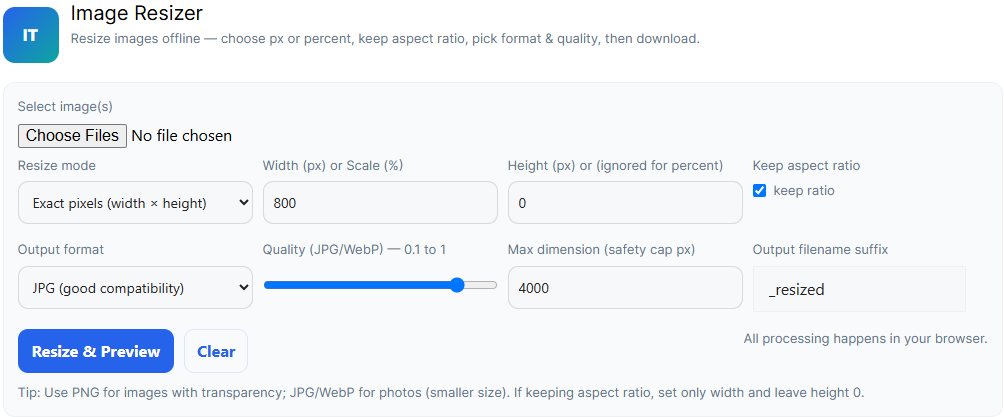
How to Resize an Image (Very Simple)
- Click Choose Files
- Select Resize mode (pixel or percent)
- Enter width (and height if needed)
- Choose PNG/JPG/WEBP output format
- Adjust quality
- Click Resize & Preview
- Download your resized photo
Done. Fast and clean.
When Should You Use This Tool?
- Uploading documents
- Sending images on WhatsApp
- Social media posts
- Fixing big photos from a phone
- Editing product images for Shopee / Lazada
- Reducing PNG size
- Website optimization
- Batch uploads
This tool does everything in one place.
Other Tools You May Need:
All free on IluvTool.
Final Thoughts
If you want a fast, simple, safe image resizer that works on mobile and desktop, this tool is honestly the easiest option. No ads, no uploads, no complicated settings.
👉 Try Image Resizer here: https://iluvtool.com/image-resizer/
“Content reviewed and human-edited for accuracy.”