Deepfake Detection Is Becoming a Daily Need – Here’s the Fastest Way to Analyze an Image or Video.
Deepfakes are increasing rapidly across social media, WhatsApp, Telegram, TikTok, dating apps and even job scams.
People now face:
- Fake face swaps
- AI-generated videos
- Altered audio
- Edited screenshots
- Manipulated pictures used for blackmail or scams
Most users have no idea how to check if a media file is real or fake.
The Deepfake Detection Analyzer at iLuvTool helps you quickly detect suspicious signs using client-side heuristic techniques, giving you fast triage (non-forensic level) results.
Everything runs locally – your image/video stays on your device.
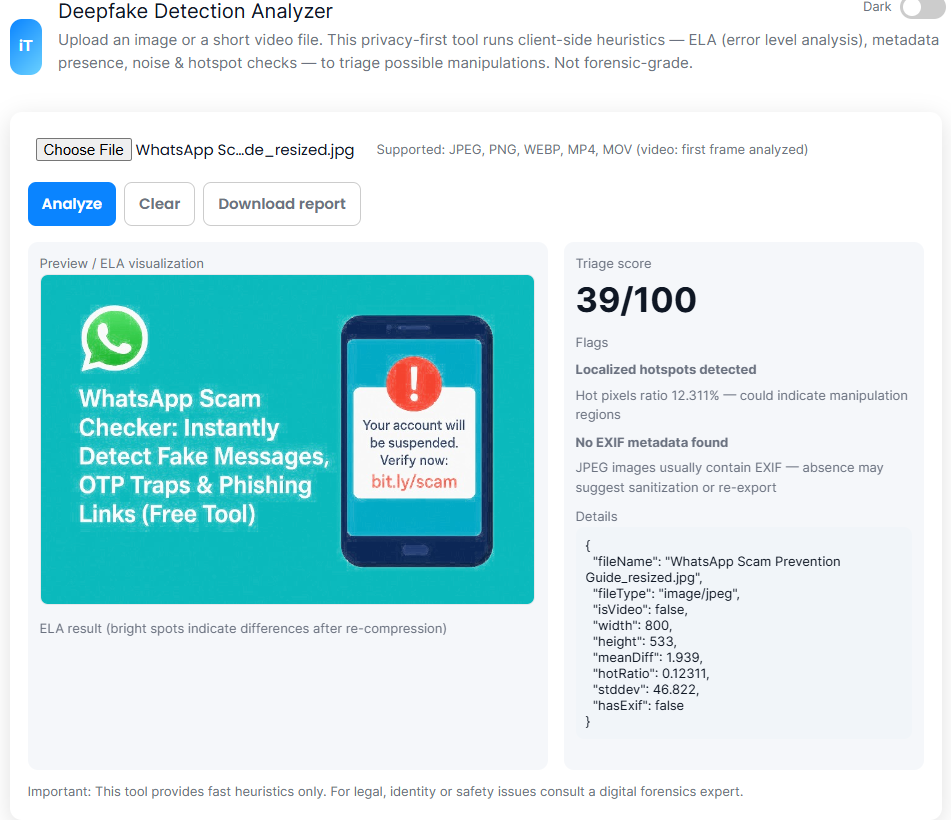
What Is the Deepfake Detection Analyzer?
It’s a privacy-first tool that analyzes images and the first frame of videos using:
- ELA (Error Level Analysis) — detects manipulation levels
- Metadata inspection — looks for missing EXIF
- Noise patterns — highlights inconsistencies
- Hotspot mapping — detects areas with different compression levels
- Face anomaly cues — blurred eyes, warped edges, skin patch inconsistency
This tool is useful for quick screening, not forensic-level legal analysis.
Why You Need a Deepfake Analyzer in 2025?
Deepfake scams are spreading through:
- WhatsApp messages
- Social media impersonations
- Fake celebrity promotions
- Extortion attempts
- Romance scams
- Fake evidence sent through email/DMs
- Politically manipulated videos
A single fake video or screenshot can damage your reputation, business or relationships.
This tool empowers you to quickly spot manipulation signs before trusting or sharing content.
How the Deepfake Detection Analyzer Works?
1. Upload an image (JPEG/PNG/WEBP)
or
Upload a video (MP4/MOV)
The tool analyzes only the first frame for faster performance.
2. Run ELA (Error Level Analysis)
If different areas of the image show uneven error levels, it may indicate editing or manipulation.
3. Metadata Check
Real photos usually contain:
- Camera model
- Lens details
- Date
- GPS
- Capture software
Deepfakes usually have:
- No metadata
- “Unknown” model
- AI generation signature
- Edited timestamps
4. Noise & Hotspot Detection
The tool highlights unnatural:
- Blurring
- Over-sharpened patches
- Uneven compression
- Edge distortions
These often happen when faces or objects are replaced.
5. Summary Report
You’ll get:
- YELLOW flags → possible manipulation
- RED flags → high suspicion
- GREEN → normal image characteristics
Conversational Q&A
“How can I check if a video is a deepfake?”
Upload the video to the Deepfake Analyzer. It scans the first frame for manipulation signs using ELA, noise and metadata checks.
“Can I detect if an image was AI-generated?”
Yes – missing metadata, uniform noise, and inconsistent compression often indicate AI-generated photos.
“Is this face swapped?”
Upload the photo to see if the face area shows irregular patterns.
“Is this WhatsApp screenshot real?”
Fake screenshots often have mismatched fonts, uneven noise and altered EXIF.
These blocks help your page appear in Google AI Overviews + ChatGPT Search.
Step-by-Step Guide: How to Use the Analyzer
1. Upload your image or video
Supports: JPEG, PNG, WEBP, MP4, MOV.
2. Tap Analyze
Processing stays inside your browser.
3. View flagged issues
You’ll see:
- Abnormal noise
- Missing metadata
- Hotspots
- Inconsistent compression
- Possible manipulation cues
4. Download report (optional)
Useful for documentation or sharing with a friend/authority.
How This Tool Compares to Other Deepfake Detectors?
📌 Advantages
- 100% browser-side processing (privacy-safe)
- Fast and lightweight
- Works on mobile + desktop
- No uploads to servers
- Can detect common editing patterns
📌 Limitations
- Not forensic-grade
- Does not analyze full videos frame-by-frame
- Cannot guarantee absolute conclusions
Perfect for quick checks, not legal evidence.
🇲🇾 Popular Deepfake Scams in Malaysia
- Fake blackmail threats using AI photos
- Deepfake voice messages through WhatsApp
- Impersonation of influencers/business owners
- Modified screenshots used for scams
- Fake loan approvals using edited documents
Safety Tips When Receiving Suspicious Media:
- Do not trust screenshots without verification
- Be careful with forwarded videos
- Avoid clicking unknown links
- Always check metadata
- Use official communication channels
FAQs:
1. Does this tool upload files to a server?
No. All analysis happens locally.
2. Can it detect AI-generated faces?
It can highlight anomalies common in AI images.
3. Does it verify full video deepfakes?
It analyzes only the first frame for speed.
4. Is this tool accurate?
Good for quick triage, but not forensic-level accuracy.
Related Tools:
- Image Copyright Checker → https://iluvtool.com/image-copyright-check/
- URL Phishing Checker → https://iluvtool.com/url-phishing-checker/
- WhatsApp Scam Message Checker→ https://iluvtool.com/face-clarity-check/
“Content reviewed and human-edited for accuracy.”